Workspace Documentation
AASPortal uses npm workspaces to organize code into distinct, reusable packages. This document provides detailed information about each workspace.
Workspace Architecture
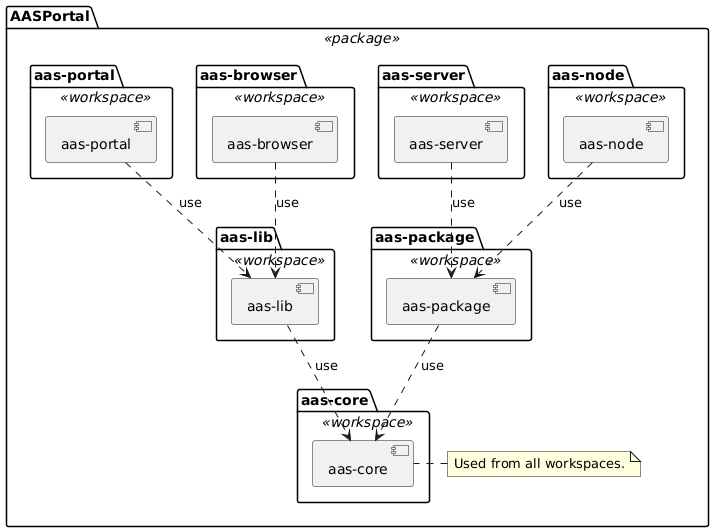
The following diagram shows the dependencies between workspaces:
Overview
Workspace |
Purpose |
Technology |
Build Output |
|---|---|---|---|
Shared types and utilities |
TypeScript, ESM |
|
|
AASX package file handling |
TypeScript, JSZip |
|
|
Frontend application |
Angular 20.3.0, NgRx |
|
|
Backend API server |
Express.js, esbuild |
|
|
Reusable UI components |
Angular Library |
|
|
AAS server (IDTA Part 2) |
Express.js, TSOA |
|
|
AAS server frontend |
Angular 20.x |
|
|
Test configuration |
Jest utilities |
|
aas-core
Location: projects/aas-core/
Purpose: Shared TypeScript definitions and utilities for Asset Administration Shell standards
Key Features
AAS Data Models: Complete TypeScript definitions for AAS elements (Properties, Files, Blobs, Operations)
Type Guards: Runtime type validation functions
Reference Types: Relationship and reference management utilities
Environment Management: Endpoint and environment configuration utilities
API Structure
src/lib/
├── aas.ts                 # Core AAS interfaces and types
├── types.ts               # Common utility types
├── convert.ts             # Data conversion utilities
├── document.ts            # Document handling and validation
├── query-parser.ts        # AAS query parsing utilities
├── authentication.ts      # Authentication types and utilities
├── cache.ts               # Caching utilities
└── index.ts               # Main exports
Usage Example
import { AAS, Submodel, Property } from 'aas-core';

const myProperty: Property = {
    category: 'PROPERTY',
    idShort: 'temperature',
    valueType: 'double',
    value: '25.5'
};
Development Commands
npm run build -w aas-core         # Build TypeScript to ESM
npm run test -w aas-core          # Run Jest tests
npm run lint -w aas-core          # ESLint validation
aas-package
Location: projects/aas-package/
Purpose: Node.js library for reading and writing AASX (Asset Administration Shell Exchange) package files
Key Features
Multi-Version Support: Read and write AAS packages in V1, V2, and V3 formats
Multiple Formats: Support for both JSON and XML serialization
AASX File Handling: Create and extract AASX package files (ZIP-based)
Type-Safe: Full TypeScript support with type definitions
Standards Compliant: Implements AAS Core 3.0 specification
API Structure
src/lib/
├── aas-reader.ts           # High-level reader API
├── aas-writer.ts           # High-level writer API
├── aasx-file.ts            # AASX file operations
├── aasx-file-builder.ts    # Build AASX packages programmatically
├── aas-v2.ts               # AAS V2 type definitions
├── types.ts                # Common type definitions
├── utilities.ts            # Utility functions
├── reader/                 # Format-specific readers
│   ├── json-reader-v2.ts   # JSON V2 reader
│   ├── json-reader-v3.ts   # JSON V3 reader
│   ├── xml-reader-v1.ts    # XML V1 reader
│   ├── xml-reader-v2.ts    # XML V2 reader
│   └── xml-reader-v3.ts    # XML V3 reader
└── writer/                 # Format-specific writers
    ├── json-writer-v2.ts   # JSON V2 writer
    ├── json-writer-v3.ts   # JSON V3 writer
    └── xml-writer-v3.ts    # XML V3 writer
Usage Example
import { AASXFile, AASReader, AASWriter } from 'aas-package';

// Reading an AASX package
const aasxFile = new AASXFile('path/to/package.aasx');
await aasxFile.open();
const environment = await AASReader.readEnvironment(aasxFile);

// Creating an AASX package
const builder = new AASXFileBuilder();
builder.addEnvironment(myEnvironment);
builder.addThumbnail('/thumbnail.png', thumbnailBuffer);
const packageBuffer = await builder.build();

// Writing to file
await AASWriter.writeFile('output.aasx', environment);
Development Commands
npm run build -w aas-package         # Build TypeScript to ESM
npm run test -w aas-package          # Run Jest tests
npm run lint -w aas-package          # ESLint validation
npm run watch -w aas-package         # Watch mode for tests
Dependencies
JSZip: ZIP file creation and extraction
xpath: XML path expressions for XML parsing
@xmldom/xmldom: XML DOM implementation
@aas-core-works/aas-core3.0-typescript: AAS Core 3.0 types
aas-portal
Location: projects/aas-portal/
Purpose: Angular-based frontend application for AAS visualization and management
Key Features
Angular 20.3.0: Latest Angular framework with signals support
NgRx State Management: Reactive state management pattern
Bootstrap 5 UI: Responsive design with ng-bootstrap components
Multi-language Support: i18n with ngx-translate
Chart Visualization: Chart.js integration for data visualization
Architecture
src/app/
├── aas/                # AAS-specific components and services
├── about/              # About page components
├── dashboard/          # Main dashboard feature module
├── main/               # Main application layout
├── shells/             # Shell management components
├── start/              # Start page components
├── view/               # View components
└── types/              # TypeScript type definitions
State Management Structure
aas/aas.state.ts- AAS entity state managementshells/shells.state.ts- Shell collection managementstart/start.state.ts- Start page stateview/view.state.ts- View state management
Development Commands
ng serve --project aas-portal     # Development server
npm run build -w aas-portal       # Production build
npm run test -w aas-portal        # Karma + Jasmine tests
ng test aas-portal --watch=false  # Run tests once
aas-node
Location: projects/aas-node/
Purpose: Express.js backend API server with multi-source AAS support
Key Features
Express.js Framework: RESTful API server
OpenAPI/Swagger: Auto-generated API documentation at
/api-docsJWT Authentication: HS256/RS256 support with configurable expiration
Multi-source Providers: File system, OPC UA, WebDAV, AAS Registry support
Database Integration: MongoDB (users), MariaDB (AAS index)
API Structure
src/app/
├── aas-index/         # AAS indexing services
├── aas-provider/      # AAS data source providers
├── auth/              # JWT and user management
├── controller/        # API route controllers
├── file-storage/      # File storage abstraction
├── live/              # Real-time data subscriptions
├── logging/           # Logging utilities
├── package/           # AASX package handling
├── routes/            # Express.js route definitions
├── scan/              # Background scanning services
├── template/          # Template management
└── types/             # TypeScript definitions
Environment Variables
AAS_NODE_PORT=80                   # Server port
ENDPOINTS=["file:///samples"]      # Initial AAS endpoints
Development Commands
npm run serve                      # Build and start server
npm run build -w aas-node          # esbuild compilation
npm run test -w aas-node           # Jest tests
npm run tsoa -w aas-node           # Generate OpenAPI specs
API Documentation
Access Swagger UI at: http://localhost/api/swagger
aas-lib
Location: projects/aas-lib/
Purpose: Reusable Angular UI components and services for AAS applications
Key Features
Angular Library: Publishable component library
AAS-specific Components: Tree view, table components, forms
Shared Services: Common business logic and data services
ng-bootstrap Integration: Bootstrap-based UI components
Component Structure
src/lib/
├── components/         # UI components
│   ├── aas-tree/       # Hierarchical AAS tree component
│   ├── aas-table/      # Data table components
│   ├── auth/           # Authentication components
│   ├── browser/        # File browser components
│   ├── license-info/   # License information component
│   └── notify/         # Notification components
├── services/           # Shared business logic services
├── views/              # AAS-specific view components
├── pipes/              # Angular pipes
└── directives/         # Angular directives
Usage Example
// In your Angular app
import { AasTreeComponent } from 'aas-lib';

@Component({
    template: '<aas-tree [data]="aasData"></aas-tree>'
})
export class MyComponent {
    aasData = // ... your AAS data
}
Development Commands
npm run build -w aas-lib           # Build Angular library
npm run test -w aas-lib            # Karma + Jasmine tests
ng build aas-lib --watch           # Watch mode development
aas-server
Location: projects/aas-server/
Purpose: Standalone AAS repository server with IDTA Part 2 compliant REST API
Key Features
IDTA Specification Compliant: Implements Asset Administration Shell Specification Part 2 (API)
Asset Administration Shell Repository: Store and manage AAS instances
Submodel Repository: Store and manage Submodels
Concept Description Repository: Manage concept descriptions
OpenAPI/Swagger: Auto-generated API documentation via TSOA
AASX Support: Handle AASX packages via aas-package library
API Structure
src/app/
├── aas-server/           # Main server implementation
├── configuration/        # Configuration management
├── controller/          # API route controllers
├── packages/            # AASX package handling
├── project/             # Project management
└── types/               # TypeScript definitions
Development Commands
npm run build -w aas-server        # esbuild compilation
npm run test -w aas-server         # Jest tests
npm run lint -w aas-server         # ESLint validation
npm run tsoa -w aas-server         # Generate OpenAPI specs
API Documentation
Access Swagger UI at: http://localhost:<port>/api-docs
aas-browser
Location: projects/aas-browser/
Purpose: Angular-based frontend application for browsing AAS server content
Key Features
Angular 20.x: Modern Angular framework
Bootstrap 5 UI: Responsive design with ng-bootstrap
AAS Browsing: Navigate and view AAS structures
Integration with aas-lib: Reuses common UI components
Connected to aas-server: Designed to work with aas-server backend
Architecture
src/app/
├── aas/                # AAS browsing components
├── main/               # Main application layout
└── types/              # TypeScript type definitions
Development Commands
ng serve --project aas-browser    # Development server
npm run build -w aas-browser      # Production build
npm run test -w aas-browser       # Karma + Jasmine tests
aas-jest
Location: projects/aas-jest/
Purpose: Jest testing utilities and helper functions for the monorepo
Key Features
Testing Utilities: Custom helper functions for Jest tests
Spy Object Creation: Enhanced spy object creation with TypeScript support
TypeScript Support: Pre-configured TypeScript compilation
ESM Module Support: Modern ES modules with Jest integration
Project Structure
projects/aas-jest/
├── src/lib/
│   ├── index.ts          # Main exports
│   └── create-spy-obj.ts # Spy object creation utilities
├── jest.config.js        # Jest configuration
├── package.json          # Package configuration
├── tsconfig.json         # TypeScript config
└── esbuild.*.js          # Build configurations
Usage in Tests
// Import testing utilities
import { createSpyObj, fail } from 'aas-jest';

// Create type-safe spy objects
const mockService = createSpyObj<MyService>(['method1', 'method2']);

// Use fail() function in tests
if (someCondition) {
    fail(); // Equivalent to expect(false).toBe(true)
}
Development Commands
npm run build -w aas-jest          # Build TypeScript to ESM + bundle
npm run build:debug -w aas-jest    # Build with debug info and source maps
npm run lint -w aas-jest           # ESLint validation
npm run format -w aas-jest         # Auto-fix linting issues
Workspace Dependencies
Dependency Graph
aas-portal → aas-lib → aas-core
aas-browser → aas-lib → aas-core
aas-node → aas-package → aas-core
aas-server → aas-package → aas-core
aas-package → aas-core
aas-jest → (used by all for testing)
Building Workspaces
Build Order
Due to dependencies, build in this order:
aas-core(no dependencies)aas-jest(no dependencies)aas-package(depends on aas-core)aas-lib(depends on aas-core)aas-portal(depends on aas-lib, aas-core)aas-browser(depends on aas-lib, aas-core)aas-node(depends on aas-package, aas-core)aas-server(depends on aas-package, aas-core)
Workspace-Specific Build Commands
# Build specific workspace
npm run build -w aas-core

# Build dependencies + target
npm run aas-portal:build    # Builds aas-core, aas-lib, aas-portal
npm run aas-node:build      # Builds aas-core, aas-node

# Build all
npm run build -ws
Testing Strategy
Backend Testing (Jest)
Unit Tests:
aas-core,aas-node,aas-jestTest Location:
src/**/*.spec.tsCoverage: Reports generated in
coverage/
Frontend Testing (Karma + Jasmine)
Unit Tests:
aas-portal,aas-libTest Location:
src/**/*.spec.tsE2E: Component integration tests
Running Tests
npm run test                # All workspaces
npm run test -w aas-core    # Specific workspace
npm run coverage            # Generate coverage reports